Mem 2 Mem VPSS-CSC & VPSS-SC device
This page is deprecated and no more supported.
This Design enable Xilinx VPSS-SC (Scaler) to work as Mem 2 Mem Device. Xilinx Frame buffer Read → Xilinx VPSS-CSC → Xilinx VPSS-Scaler → Xilinx Frame buffer write act as composite device.
Reference Design
This reference design is with ZCU102
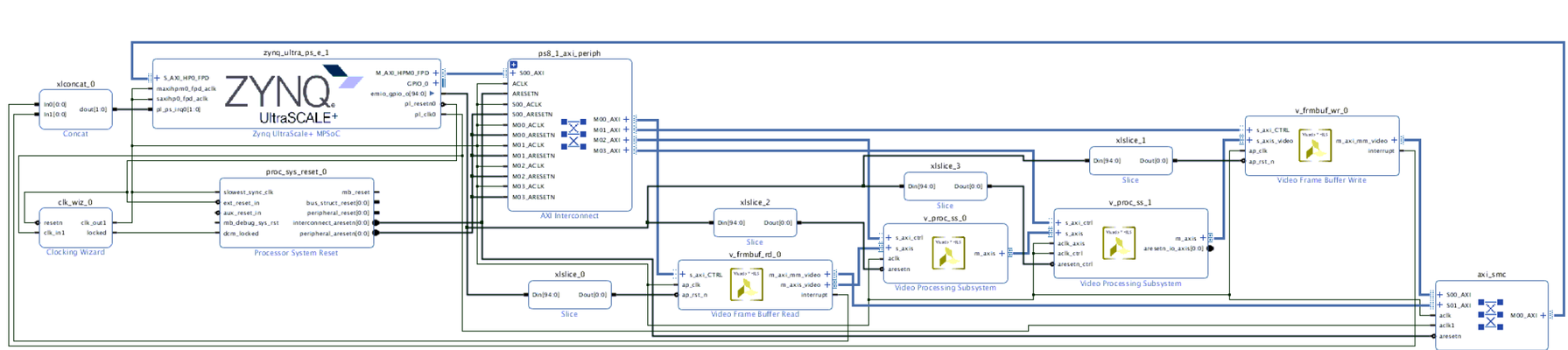
Device tree binding
The dts node should be defined with correct configuration. The common dts properties are described in video.txt
               v_frmbuf_rd_0: v_frmbuf_rd@a0010000 {
                        compatible = "xlnx,axi-frmbuf-rd-v2";
                        #dma-cells = <1>;
                        interrupt-parent = <&gic>;
                        interrupts = <0 90 4>;
                        reg = <0x0 0xa0010000 0x0 0x10000>;
                        reset-gpios = <&gpio 78 1>;
                        xlnx,dma-addr-width = <32>;
                        xlnx,vid-formats = "rgb888", "bgr888", "yuyv";
                };
                csc_1:csc@a0100000 {
                        compatible = "xlnx,v-vpss-csc";
                        reg = <0x0 0xa0100000 0x0 0x100000>;
                        clocks = <&vid_stream_clk>;
                        reset-gpios = <&gpio 80 1>;

                        ports {
                                #address-cells = <1>;
                                #size-cells = <0>;
                                port@0 {
                                        reg = <0>;
                                        xlnx,video-format = <2>;
                                        xlnx,video-width = <8>;

                                        csc_in: endpoint {
                                                remote-endpoint = <&rb_out>;
                                        };
                                };
                                port@1 {
                                        reg = <1>;
                                        xlnx,video-format = <2>;
                                        xlnx,video-width = <8>;

                                        csc_out: endpoint {
                                                remote-endpoint = <&sc_in>;
                                        };
                                };
                        };
                };

                scaler_1:scaler@a0040000 {
                        compatible = "xlnx,v-vpss-scaler";
                        reg = <0x0 0xa0040000 0x0 0x40000>;
                        clocks = <&vid_stream_clk>;
                        xlnx,num-hori-taps = <6>;
                        xlnx,num-vert-taps = <6>;
                        xlnx,pix-per-clk = <2>;
                        reset-gpios = <&gpio 81 1>;

                        ports {
                                #address-cells = <1>;
                                #size-cells = <0>;
                                port@0 {
                                        reg = <0>;
                                        xlnx,video-format = <2>;
                                        xlnx,video-width = <8>;

                                        sc_in: endpoint {
                                                remote-endpoint = <&csc_out>;
                                        };
                                };
                                port@1 {
                                        reg = <1>;
                                        xlnx,video-format = <2>;
                                        xlnx,video-width = <8>;

                                        sc_out: endpoint {
                                                remote-endpoint = <&wb_in>;
                                        };
                                };
                        };
                };


                v_frmbuf_wr_0: v_frmbuf_wr@a0000000 {
                        compatible = "xlnx,axi-frmbuf-wr-v2";
                        #dma-cells = <1>;
                        interrupt-parent = <&gic>;
                        interrupts = <0 89 4>;
                        reg = <0x0 0xa0000000 0x0 0x10000>;
                        reset-gpios = <&gpio 79 1>;
                        xlnx,dma-addr-width = <32>;
                        xlnx,vid-formats = "rgb888", "bgr888", "yuyv";
                };

                video_m2m {
                        compatible = "xlnx,mem2mem";
                        dmas = <&v_frmbuf_rd_0 0>, <&v_frmbuf_wr_0 0>;
                        dma-names = "tx", "rx";
                        ports {
                                #address-cells = <1>;
                                #size-cells = <0>;
                                port@0 {
                                        reg = <0>;
                                        direction = "input";

                                        wb_in: endpoint {
                                                remote-endpoint = <&sc_out>;
                                        };
                                };

                                port@1 {
                                        reg = <1>;
                                        direction = "output";

                                        rb_out: endpoint {
                                                remote-endpoint = <&csc_in>;
                                        };

                                };
                        };

                };
Test Commands:
With above device tree, you will find below media device in linux.
# media-ctl -p
Media controller API version 4.14.0

Media device information
------------------------
driver          xilinx-mem2mem
model           Xilinx Videoi M2M Composite Dev
serial
bus info
hw revision     0x0
driver version  4.14.0

Device topology
- entity 1: xilinx-mem2mem (2 pads, 2 links)
            type Node subtype V4L flags 0
            device node name /dev/video0
        pad0: Sink
                <- "a0040000.scaler":1 [ENABLED]
        pad1: Source
                -> "a0100000.csc":0 [ENABLED]

- entity 6: a0100000.csc (2 pads, 2 links)
            type V4L2 subdev subtype Unknown flags 0
            device node name /dev/v4l-subdev0
        pad0: Sink
                [fmt:RBG888_1X24/1280x720 field:none]
                <- "xilinx-mem2mem":1 [ENABLED]
        pad1: Source
                [fmt:RBG888_1X24/1280x720 field:none]
                -> "a0040000.scaler":0 [ENABLED]

- entity 9: a0040000.scaler (2 pads, 2 links)
            type V4L2 subdev subtype Unknown flags 0
            device node name /dev/v4l-subdev1
        pad0: Sink
                [fmt:RBG888_1X24/1280x720 field:none]
                <- "a0100000.csc":1 [ENABLED]
        pad1: Source
                [fmt:RBG888_1X24/1920x1080 field:none]
                -> "xilinx-mem2mem":0 [ENABLED]
First configure Scaler and CSC sink and src pads to required formats.
media-ctl -d /dev/media0 -V "\"a0100000.csc\":0 [fmt:RBG888_1X24/1920x1080 field:none]"
media-ctl -d /dev/media0 -V "\"a0100000.csc\":1 [fmt:UYVY8_1X16/1920x1080 field:none]"

media-ctl -d /dev/media0 -V "\"a0040000.scaler\":0 [fmt:UYVY8_1X16/1920x1080 field:none]"
media-ctl -d /dev/media0 -V "\"a0040000.scaler\":1 [fmt:UYVY8_1X16/1280x720 field:none]"
Then fire the GST command. Here 1920X1080 RGB is the input to the v4l2video0convert and the output is scaled and converted to 1280X720 YUY2
gst-launch-1.0 videotestsrc num-buffers=10 ! video/x-raw, width=1920, height=1080, format=RGB ! v4l2video0convert capture-io-mode=4 output-io-mode=4 ! video/x-raw, width=1280, height=720, format=YUY2 ! filesink location=tmp0.yuy2
Command to scale YUY2
media-ctl -d /dev/media0 -V "\"a0100000.csc\":0 [fmt:UYVY8_1X16/1920x1080 field:none]"
media-ctl -d /dev/media0 -V "\"a0100000.csc\":1 [fmt:RBG888_1X24/1920x1080 field:none]"

media-ctl -d /dev/media0 -V "\"a0040000.scaler\":0 [fmt:RBG888_1X24/1920x1080 field:none]"
media-ctl -d /dev/media0 -V "\"a0040000.scaler\":1 [fmt:RBG888_1X24/1280x720 field:none]"
© Copyright 2019 - 2022 Xilinx Inc. Privacy Policy