Video_Mixer
This page gives an overview of the Linux DRM based Video Mixer driver . Paths, files, links and documentation on this page are given relative to the Linux kernel source tree.
Table of Contents
Overview
The Linux Video Mixer driver is DRM kernel driver designed to provide support for the Xilinx LogiCORE IP Video Mixer . The Video Mixer is a configurable IP core than can blend up to 16 video layers in addition to an optional logo layer into a single output video stream. Driver is present at https://github.com/Xilinx/linux-xlnx/blob/master/drivers/gpu/drm/xlnx/xlnx_mixer.c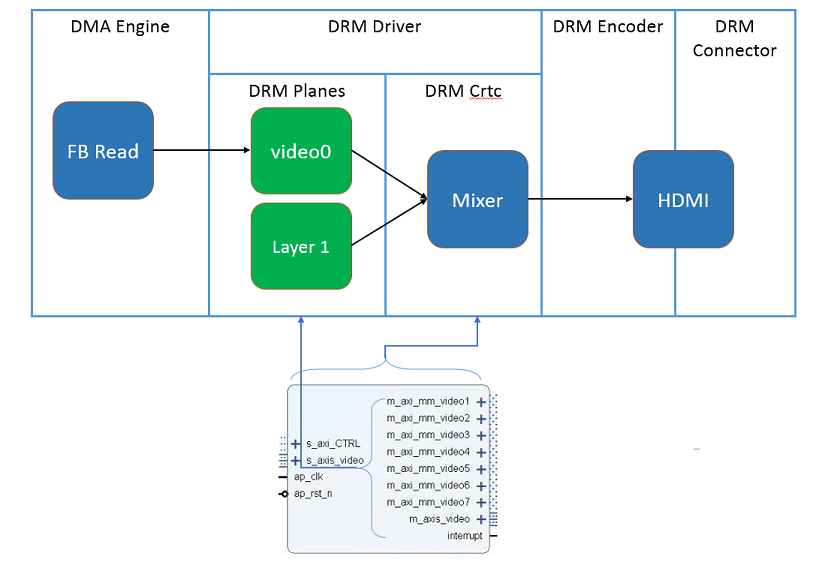
Supported IP Features
The following is a list of IP constraints for which there is support in the driver.IP Feature | 2018.1/2018.3 | 2019.1/2019.2 | 2020.1 |
|---|---|---|---|
| Output Stream | RGB/YUV444/YUV422/YUV420 | ||
| Samples per Clock | 1, 2 and 4 | ||
| Maximum Data Width | 8, 10 | ||
| Maximum Number of Columns | 4096 | 8192 | |
| Maximum Number of Rows | 2160 | 4320 | |
| Number of Layers | 8 | 16 | |
| Layer Video Formats | RGB8, RGBX8, YUYV8, RGBA8, BGRA8, Y_UV8, Y_UV8_420, YUV8, YUVX8, Y8, UYVY8, BGRX8, RGBX10, YUVX10, RGB565, Y_UV10, Y_UV10_420, Y10 | ||
| Layer Alpha | Yes | ||
| Layer Scaling | Yes | ||
| Layer Interface | Memory, Streaming | ||
| Logo Layer | Yes | ||
| Logo Layer per Pixel Alpha | Yes | ||
| IP Revision | 3.0 | 4.0 | 5.0 |
Limitations
- 12 and 16 bpc not tested
- RGB565 color format not tested
- 1 and 4 ppc not tested
- Logo layer transperancy color not supported in driver
- DRM bridge interface is not supported in driver
- Backward compatibility for IP versions 1.0 and 2.0 are not supported in >=2018.1 drivers
- Driver has been verified upto 3840x2160 resolution only.
- Driver has been tested with 2 ppc only
- streaming formats yuv444 and yuv420 are not tested
- Interlaced resolutions are not tested
Kernel Configuration
CONFIG_DRM_XLNX_MIXER should be enabled. This depends on CONFIG_DRM_XLNX and CONFIG_DRM
Location: → Device Drivers → Graphics support → Xilinx DRM KMS Driver
Device Tree Configuration
DRM Implementation Overview
- Primary: this serves as the mode-setting layer and determines the background screen image
- Overlay: a layer designed to be superimposed over the primary layer. It can be a streaming or memory interface
- Cursor: a special layer designed to represent a screen pointer or equivalent
By default, the Mixer’s various layers will be mapped to the above DRM Plane roles as follows:
| Mixer IP Layer | DRM Plane Type |
| Output stream layer | Primary |
| Layer 1-8 (2018.1/2018.3) | Overlay |
| Layer 1-16(2019.1) | Overlay |
| Logo | Cursor |
The default assignment of the layer serving as DRM Primary can be overridden in the device tree with the optional property xlnx,layer-primary. This property can be used to assign the role of “primary” to any one of the Mixer layers(except logo) present in the design. Other hardware layers will be assigned the role of “overlay” layer.
As an overlay plane, the output stream layer will only respond to video format changes; its size will always correspond to the current size of the assigned primary layer. There are several cases wherein assignment of the primary layer to a mixer overlay layer might be advantageous:
- Your mixer instance is configured to stream out YUV 4:2:2 but you wish to present user space drivers with an ARGB memory interface. You could configure the Mixer with an overlay layer that accepts ARGB memory formatted data and assign this as the DRM primary layer. User space is able to write ARGB and conduct normal mode setting/resolution changes through this layer yet the final output, via the Mixer, will be transformed into YUV 4:2:2.
- Your use case is such that using overlays superimposed over a background primary plane does not work. Instead, you wish the background layer to be the top layer( in z-order position and utilize per-pixel alpha values to create open regions in the background through which content can be framed underneath. This might be done in the case where the primary plane is used to render video/audio controls and the video is displayed beneath this superimposed gui background. By assigning the primary plane to be the uppermost layer, the remaining layers can be used, effectively, as underlays.
From within Vivado, Mixer layers can be configured with the following optional properties:
- layer alpha
- layer scaling (1x, 2x or 4x)
These properties, if described in the device tree, will be represented as DRM plane properties. To understand more about these capabilities, please refer to the Video Mixer Product Guide [PG243].
Additionally, the Video Mixer supports generation of solid background color when either the AXI streaming input is not connected or the layer is otherwise disabled. On initialization, this color is programmed to default to blue. The color may be configured using a value representing packed RGB little-endian format via the DRM plane property bg_color. This property is attached to the primary plane.
CSC coefficients programming
IP version 5.0, provides option to enable CSC coefficient registers to be applied on primary layer.
Driver adds the COLOR_ENCODING and COLOR_RANGE properties to support BT601/709/2020 color encoding schemes with limited and full range.
driver by default configures to BT709 with Limited range.
For more details about DRM framework supported encoding schemes, please refer drm_color_mgmt.h
Test Procedure
To verify the proper configuration and operation of the IP, a suitable hardware design will need to include at a minimum:
- Video DMA IP to supply an input stream to the Mixer IP (layer 0) (Framebuffer Read DMA IP)
- Video Mixer IP
- Encoder driver(HDMI-TX / SDI-TX / MIPI DSI-TX)
modetest
Modetest is a test tool which can be found as part of the libdrm suite of test tools. We will use this tool to ensure proper configuration and operation of the Mixer IP. Modetest can be used to activate overlay layers and alter layer properties (e.g. layer alpha, layer scaling, background color) & coefficient register programming for csc by passing color encoding and range properties. Following table captures the property values of encoding and range .
| COLOR_ENCODING | Value | COLOR_RANGE | Value |
|---|---|---|---|
| DRM_COLOR_YCBCBR_BT601 | 0 | DRM_COLOR_YCBCR_LIMITED_RANGE | 0 |
| DRM_COLOR_YCBCR_BT709 | 1 | DRM_COLOR_YCBCR_FULL_RANGE | 1 |
| DRM_COLOR_YCBCR_BT2020 | 2 |
Test 1 - Ensure DRM driver has been properly loaded and is configured
root@mixer_proj:~# modetest -M xlnx
Below is a Sample output of 2019.1 SDI-Tx with 10bpc as the encoder (edited for brevity and clarity):
root@zcu106-zynqmp:~# modetest -M xlnx
Encoders:
id      crtc    type    possible crtcs  possible clones
48      0       TMDS    0x00000001      0x00000000

Connectors:
id      encoder status          name            size (mm)       modes   encoders
 49      0       connected       unknown-1       0x0             49      48
   modes:
         name refresh (Hz) hdisp hss hse htot vdisp vss vse vtot)
   4096x2160 60 4096 4184 4272 4400 2160 2168 2178 2250 593408 flags: phsync, pvsync; type: driver
   4096x2160 50 4096 5064 5152 5280 2160 2168 2178 2250 594000 flags: phsync, pvsync; type: driver
      <snip>
   1280x720 24 1280 2250 3155 4125 720 725 730 750 74250 flags: phsync, pvsync; type: driver
   720x576i 50 720 732 795 864 288 290 293 312 13500 flags: phsync, pvsync, interlace, dblclk; type: driver
   720x486i 60 720 739 801 858 243 247 250 262 13500 flags: phsync, pvsync, interlace, dblclk; type: driver
   props:
         1 EDID:
                 flags: immutable blob
                 blobs:

                value:
         2 DPMS:
                 flags: enum
                 enums: On=0 Standby=1 Suspend=2 Off=3
                 value: 3
         5 link-status:
                 flags: enum
                 enums: Good=0 Bad=1
                 value: 0 		<snip>
        51 sdi_mode:
                 flags: range
                 values: 0 5
                 value: 2
         52 sdi_data_stream:
                 flags: range
                 values: 2 8
                 value: 4

CRTCs:
id      fb      pos     size
47      0       (0,0)   (0x0)
    0 0 0 0 0 0 0 0 0 0 flags: ; type:
   props:

Planes:
id      crtc    fb      CRTC x,y        x,y     gamma size      possible crtcs
29      0       0       0,0             0,0     0               0x00000001
   formats: RA24
   props:
         6 type:
                 flags: immutable enum
                 enums: Overlay=0 Primary=1 Cursor=2
                 value: 2
         27 scale:
                 flags: range
                 values: 0 2
                 value: 0
         28 alpha:
                 flags: range
                 values: 0 256
                 value: 256 30      0       0       0,0             0,0     0               0x00000001
   formats: YUYV
   props:
         6 type:
                 flags: immutable enum
                 enums: Overlay=0 Primary=1 Cursor=2
                 value: 0
         27 scale:
                 flags: range
                 values: 0 2
                 value: 0
         28 alpha:
                 flags: range
                 values: 0 256
                 value: 256 31      0       0       0,0             0,0     0               0x00000001
   formats: XV15
   props:
         6 type:
                 flags: immutable enum
                 enums: Overlay=0 Primary=1 Cursor=2
                 value: 0
         27 scale:
                 flags: range
                 values: 0 2
                 value: 0
         28 alpha:
                 flags: range
                 values: 0 256
                 value: 256 32      0       0       0,0             0,0     0               0x00000001
   formats: AB24
   props:
         6 type:
                 flags: immutable enum
                 enums: Overlay=0 Primary=1 Cursor=2
                 value: 0
         27 scale:
                 flags: range
                 values: 0 2
                 value: 0
         28 alpha:
                 flags: range
                 values: 0 256
                 value: 256 33      0       0       0,0             0,0     0               0x00000001
   formats: BG24
   props:
         6 type:
                 flags: immutable enum
                 enums: Overlay=0 Primary=1 Cursor=2
                 value: 0
         27 scale:
                 flags: range
                 values: 0 2
                 value: 0
         28 alpha:
                 flags: range
                 values: 0 256
                 value: 256 34      0       0       0,0             0,0     0               0x00000001
   formats: XB24
   props:
         6 type:
                 flags: immutable enum
                 enums: Overlay=0 Primary=1 Cursor=2
                 value: 0
         27 scale:
                 flags: range
                 values: 0 2
                 value: 0
         28 alpha:
                 flags: range
                 values: 0 256
                 value: 256 35      0       0       0,0             0,0     0               0x00000001
   formats: NV12
   props:
         6 type:
                 flags: immutable enum
                 enums: Overlay=0 Primary=1 Cursor=2
                 value: 0
         27 scale:
                 flags: range
                 values: 0 2
                 value: 0
         28 alpha:
                 flags: range
                 values: 0 256
                 value: 256 36      0       0       0,0             0,0     0               0x00000001
   formats: XV20
   props:
         6 type:
                 flags: immutable enum
                 enums: Overlay=0 Primary=1 Cursor=2
                 value: 0
         27 scale:
                 flags: range
                 values: 0 2
                 value: 0
         28 alpha:
                 flags: range
                 values: 0 256
                 value: 256 37      0       0       0,0             0,0     0               0x00000001
   formats: BG24
   props:
         6 type:
                 flags: immutable enum
                 enums: Overlay=0 Primary=1 Cursor=2
                 value: 0
         27 scale:
                 flags: range
                 values: 0 2
                 value: 0
         28 alpha:
                 flags: range
                 values: 0 256
                 value: 256 38      0       0       0,0             0,0     0               0x00000001
   formats: RG24
   props:
         6 type:
                 flags: immutable enum
                 enums: Overlay=0 Primary=1 Cursor=2
                 value: 0
         28 alpha:
                 flags: range
                 values: 0 256
                 value: 256 39      0       0       0,0             0,0     0               0x00000001
   formats: RG24
   props:
         6 type:
                 flags: immutable enum
                 enums: Overlay=0 Primary=1 Cursor=2
                 value: 0
         28 alpha:
                 flags: range
                 values: 0 256
                 value: 256 40      0       0       0,0             0,0     0               0x00000001
   formats: RG24
   props:
         6 type:
                 flags: immutable enum
                 enums: Overlay=0 Primary=1 Cursor=2
                 value: 0
         28 alpha:
                 flags: range
                 values: 0 256
                 value: 256 41      0       0       0,0             0,0     0               0x00000001
   formats: RG24
   props:
         6 type:
                 flags: immutable enum
                 enums: Overlay=0 Primary=1 Cursor=2
                 value: 0
         28 alpha:
                 flags: range
                 values: 0 256
                 value: 256 42      0       0       0,0             0,0     0               0x00000001
   formats: RG24
   props:
         6 type:
                 flags: immutable enum
                 enums: Overlay=0 Primary=1 Cursor=2
                 value: 0
         28 alpha:
                 flags: range
                 values: 0 256
                 value: 256 43      0       0       0,0             0,0     0               0x00000001
   formats: RG24
   props:
         6 type:
                 flags: immutable enum
                 enums: Overlay=0 Primary=1 Cursor=2
                 value: 0
         28 alpha:
                 flags: range
                 values: 0 256
                 value: 256 44      0       0       0,0             0,0     0               0x00000001
   formats: RG24
   props:
         6 type:
                 flags: immutable enum
                 enums: Overlay=0 Primary=1 Cursor=2
                 value: 0
         28 alpha:
                 flags: range
                 values: 0 256
                 value: 256 45      0       0       0,0             0,0     0               0x00000001
   formats: RG24
   props:
         6 type:
                 flags: immutable enum
                 enums: Overlay=0 Primary=1 Cursor=2
                 value: 0
         28 alpha:
                 flags: range
                 values: 0 256
                 value: 256 46      0       0       0,0             0,0     0               0x00000001
   formats: XV20
   props:
         6 type:
                 flags: immutable enum
                 enums: Overlay=0 Primary=1 Cursor=2
                 value: 1

Frame buffers:
 id      size    pitch
root@mixer_proj:~# modetest -M xlnx -P 33@47:640x480+0+0@BG24
testing 640x480@BG24 overlay plane 33
Test 3 - Scale the layer (if enabled for the layer)
From within another console window (and/or if the previous test was run in the background), adjust the layer scale property using modetest. The plane id (33 in case of the example above) will be needed to adjust overlay properties like scale, alpha or background colorroot@mixer_proj:~# modetest -M xlnx -w 33:scale:1
33      0       0       0,0             0,0     0               0x00000001
  formats: BG24
  props:
        5 type:
                flags: immutable enum
                enums: Overlay=0 Primary=1 Cursor=2
                value: 0
        23 scale:
                flags: range
                values: 0 2
                value: 0
        24 alpha:
                flags: range
                values: 0 256
                value: 256
Test 4 - Change layer alpha (if enabled for the layer)
Changing the layer alpha will make an existing overlay layer appear more or less transparent. An alpha value of '0' will render the overlay invisible and a value of '256' will be completely opaque. With an existing layer being displayed (see test 2), change the alpha property to '0' to render the layer invisible.root@mixer_proj:~# modetest -M xlnx -w 33:alpha:0
root@mixer_proj:~# modetest -M xlnx -w 33:alpha:256
Test 5 - Change the background color
The Mixer generates a background color when the primary layer is inactive. By default, this is blue. The color is controlled by an internal RGB-based register and is represented by modetest as a decimal value. The most significant bits represent 'blue' and the least 'red'. As such, by default, only the upper 8 bits are set to generate a solid blue (0xFF0000) resulting in a default value of 16711680.root@mixer_proj:~# modetest -M xlnx -w 34:bg_color:255
Test 6 - Change the output resolution
To change Mixer output to a new resolution, modetest must be invoked with the connector id and new resolution. In this example, we change to output 1920x1080:root@mixer_proj:~# modetest -M xlnx -s 49:1920x1080@BG24
setting mode 1920x1080-60Hz@BG24 on connectors 49, crtc 47
Vbltest
vbltest is a test tool which is part of the libdrm suite of test tools. It is used to ensure vertical blanking interrupts are properly sent by the DRM driver.
Test 7- Vbltest - Testing vertical blanking interrupts
root@mixer_proj:~# vbltest -M xlnx
starting count: 0
freq: 60.49Hz
freq: 60.00Hz
freq: 60.00Hz
freq: 60.00Hz
Known Issues
- AR66753 - LogiCORE Video Mixer - Release Notes and Known Issues for the Vivado 2016.1 tool and later versions
Change log
2024.1
- No change.
2023.2
- No Change.
2023.1
- Summary:
- No Change.
2022.2
- Summary:
- Correct the fourcc string copy
- commits:
- 51922bb: drm: xlnx: mixer: Correct the fourcc string copy
2022.1
- Summary:
- Release previously acquired DMA channels when unbind
- Fixed compilation errors of 5.15
- Commits:
2021.2
- Summary:
- Use source rectangle for scaling check
- Fix VTC bridge un-registration
- Fixed bug in mixer un-registration
- Added error check if requested dimensions are not scalable
- Fix typo in dimension error message
- Fix VTC bridge un-registration
- Add DP live bridge support
- Added 64-bit DMA address support
- Added module variable to enable/disable primary plane
- Fix asyc update kernel warning
- Commits:
- 1f8c6e drm: xlnx: mixer: Use source rectangle for scaling check
- a38c06 drm: xlnx: mixer: defer owned VTC bridge un-registration
- f9354e drm: xlnx: mixer: unregister component when mixer is removed
- d129cc drm: xlnx: mixer: Return error if requested dimensions not scalable
- 7fbebf drm: xlnx: mixer: Fix typo in dimension error message
- 672871 drm: xlnx: mixer: defer owned VTC bridge un-registration
- cf9780 drm: xlnx: mixer: Add DP live bridge support
- 07331c drm: xlnx: mixer: Allow reserving memory and DMA using 64bit addresses
- a70bc5 drm: xlnx: mixer: Added module variable to enable/disable primary plane
- a80bc7 drm: xlnx: mixer: Fix async update kernel warning
2021.1
- Summary:
- Added support to program CSC coefficients
- Commits:
- 149b14 drm: xlnx: mixer: Add support to update color space conversion coefficients
2020.2
- Summary:
- Added support to 8K resolution
- Removed unused variables
- Fixed comparison expression
- Handle software vblank
- Commits:
2020.1
- Summary:
- Added support to program CSC coefficients
- Commits:
- 149b14 drm: xlnx: mixer: Add support to update color space conversion coefficients
2019.2
- Summary:
- Bug fixes for vblank timeout warn on message and error handling
- Commits:
2019.1
- Summary:
- Introduced 16-layer support to Mixer IP 4.0 with backward compatibility
- Commits:
- 286f15 drm: xlnx: mixer: Adding 16 layer support
2018.3
- Summary:
- Fix switching to 4K after 1080p
- Fixed linking failure for ARCH arm 32 bit mode
- Added support to 64-bit dma address width
- Added VTC bridge support
- Added atomic check for invalid coordinates
- Made logo layer as optional
- Commits:
- 18d077 drm: xlnx: mixer: Fix switching to 4K after 1080p
- 9a9a7e drm: xlnx: mixer: Fix linking failure for ARCH arm
- f7396d drm: xlnx: mixer: Fix bug in programming 64-bit address
- a4518c drm: xlnx: mixer: Add VTC bridge support
- f15f4c drm: xlnx: mixer: Added the atomic check for invalid coordinates
- 5f832a drm: xlnx: mixer: making logo layer optional
2018.2
- Summary:
- Support to update the planes asynchronously
- Commits:
- 1a8900 drm: xlnx: mixer: Update planes asynchronously in the legacy entry
2018.1
- Summary:
- Added IP reset logic
- Removed deprecated dma engine call
- Fixed wrong stride alignment
- Corrected loop termination condition logic
- Added more colours to mixer sanity table of colour list
- Added 10-bit support
- Added support to Mixer IP 3.0
- Passed the correct values of cursor height and width
- Fixed occasional kernel oops during logo layer programming
- Used xlnx pipeline init call as dt-binding is removed
- Initial version based on new xlnx DRM framework
- Commits:
- 131012 drm: xlnx: mixer: reset the mixer IP before programming
- 23a216 drm: xlnx: mixer: remove deprecated dmaengine_terminate_all
- 2ebd5b drm: xlnx: mixer: Fixing wrong stride alignment
- 29d7cf drm: xlnx: mixer: Correcting loop termination condition
- ac80a8 drm: xlnx: mixer: Adding more colors in supported list
- 807fda drm: xlnx: mixer: Adding 10 bit color support
- 29b851 drm: xlnx: mixer: Adding mixer 3.0 IP support
- f31cfb drm: xlnx: mixer: Correcting the cursor width and height
- 868584 drm: xlnx: mixer: logo layer fix
- 4f150d drm: xlnx: mixer: Use xlnx pipeline call
Related Links
© Copyright 2019 - 2022 Xilinx Inc. Privacy Policy