Zynq UltraScale+ MPSoC VCU TRD 2018.3 - HDMI Video Capture and HDMI Display With SDSoC
Zynq UltraScale+ MPSoC VCU TRD 2018.3 - HDMI Video Capture and HDMI Display With SDSoC
Table of Contents
1 Overview
This design-module demonstrates how to add a data-copy (also known as By-Pass) accelerator between HDMI Video Capture (HDMI-Rx) and HDMI Display (HDMI-Tx) pipelines in PL using SDSoC tool. The accelerator function (which simply copy the input data to output) is translated to RTL using the Vivado HLS compiler (which is part of SDSoC tool).
Sources:
- HDMI-Rx capture pipeline implemented in the PL.
- File source (SD card, USB storage, SATA hard disk).
- Stream-In from network or internet.
Sinks:
- HDMI-Tx display pipeline implemented in the PL.
VCU Codec:
- Video Encode/Decode capability using VCU hard block in PL
- AVC/HEVC encoding.
- Encoder/decoder parameter configuration.
Streaming Interfaces:
- 10G PL Ethernet.
- 1G Ethernet on PS
Supported Resolution:
The table below provides the supported resolution from a command line app in this design.
| Resolution | Command Line | |
| Single Stream | Multi-stream | |
| 4kp60 | √ | NA |
| 4kp30 | √ | NA |
| 1080p60 | √ | NA |
| 1080p30 | √ | NA |
√ - Supported
NA – Not applicable
x – Not supported
The below table gives information about the features supported in this design.
| Pipeline | Input source | Output Type | Resolution | VCU codec |
|---|---|---|---|---|
Capture --> bypass --> Display (Passthrough pipeline) With and without bypass plugin | HDMI-Rx | HDMI-Tx | 4KP/1080p | None |
Stream-Out pipeline with and without bypass plugin | HDMI-Rx | Stream-Out | 4K/1080p | HEVC/AVC |
File/Streaming Playback pipeline with and without bypass plugin | File Source/ Stream-In | HDMI-Tx | 4K/1080p | HEVC/AVC |
Capture--> Encode--> Decode--> Display without bypass plugin | HDMI-Rx | HDMI-Tx | 4K/1080p | HEVC/AVC |
Record pipeline without bypass plugin | HDMI-Rx | File Sink | 4K/1080p | HEVC/AVC |
For the overview, software tools, system requirements and design files, follow the link below:
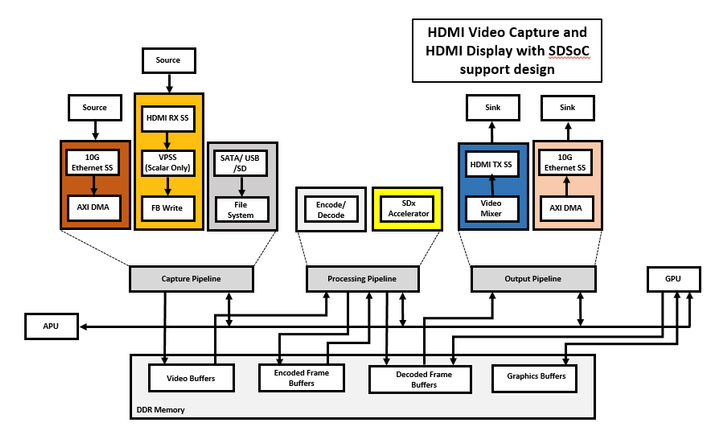
The below figure shows the VCU TRD design hardware block diagram.
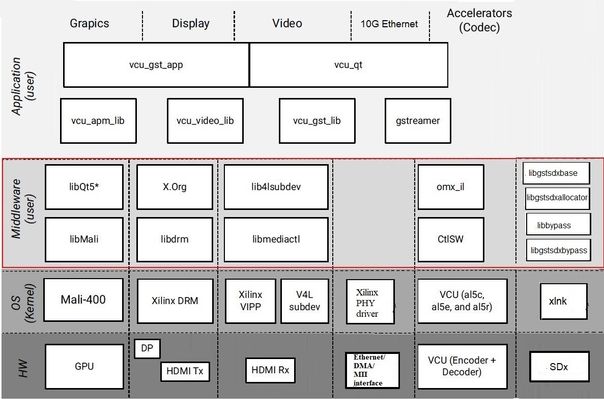
The below figure shows the HDMI Video Capture and HDMI Display with SDSoC support design software block diagram.
1.1 Board Setup
Refer below link for Board Setup
1.2 Run Flow
The TRD package has ready-to-test SD-card images that enable the user to run the demo.
- Copy all the files from the $TRD_HOME/images/vcu_sdx/ to a FAT formatted SD card.
Refer below link to download all TRD contents.
TRD package contents are placed in the following directory structure.
TRD package contents specific to this design are placed in the following directory structure. The user needs to copy all the files from the $TRD_HOME/images/vcu_sdx/ to FAT32 formatted SD card directory.
└── rdf0428-zcu106-vcu-trd-2018-3
    ├── apu
    │   ├── apps
    │   └── vcu_petalinux_bsp
    ├── documentation
    ├── images
    │   ├── vcu_sdx
    │   │   ├── autostart.sh
    │   │   ├── bin
    │   │   ├── BOOT.BIN
    │   │   ├── config
    │   │   ├── image.ub
    │   │   ├── system.dtb
    │   │   └── vcu
    ├── pl
    │   ├── constrs
    │   ├── pre-built
    │   │   ├── vcu_sdx
    │   ├── Readme.txt
    │   ├── scripts
    │   │   └── vcu_sdx.tcl
    │   └── srcs
    └── README.txt
Configuration files(input.cfg) for various resolutions are placed in the following directory structure in /media/card.
config/
├── 4kp60
│   ├── Display
│   ├── Stream-out
│   └── Stream-in
├── 4kp30
│   ├── Display
│   ├── Stream-out
│   └── Stream-in
├── 1080p60
│   ├── Display
│   ├── Stream-out
│   └── Stream-in
└── input.cfg
1.2.1 GStreamer Application (vcu_gst_app)
The vcu_gst_app is a command line multi-threaded Linux application. The command line application requires an input configuration file (input.cfg) which is a plain text file.
To execute the application, run the following command:
% vcu_gst_app <path to *.cfg file>
Example:
4kp60 Passthrough pipeline execution with a bypass filter
% vcu_gst_app /media/card/config/input.cfg
4kp60 HEVC_HIGH Display Pipeline execution
% vcu_gst_app /media/card/config/4kp60/Display/Single_4kp60_HEVC_HIGH.cfg
4kp60 HEVC_HIGH Stream-out Pipeline execution
% vcu_gst_app /media/card/config/4kp60/Stream-out/Single_4kp60_HEVC_HIGH.cfg
4kp60 HEVC_HIGH Stream-in Pipeline execution
% vcu_gst_app /media/card/config/4kp60/Stream-in/input.cfg
NOTE: Make sure HDMI-Rx should be configured to 4kp60 mode.
To measure the latency of the pipeline, run the below command. The latency data is huge, so dump it to a file.
% GST_DEBUG="GST_TRACER:7" GST_TRACERS="latency;scheduletime" ./vcu_gst_app ./input.cfg >& dump_log.txt
1.3 Build Flow
Refer below link for Build Flow tutorial of VCU PetaLinux BSP:
By Pass Sample and GStreamer Plugin
This tutorial shows how to build the By-Pass accelerator sample with/without HW acceleration based on the VCU TRD SDSoC platform.
- Set the build environment variables. This requires that you have previously completed the PetaLinux SDK installation step from Zynq UltraScale+ MPSoC VCU TRD 2018.3 - Run and Build Flow.
Note 1: Make sure you set the env variables in the same shell that is used to launch SDx. Also make sure the env variables are set before starting SDx, otherwise close and re-start SDx.
Note 2: The below command might ask you to execute unset LD_LIBRARY_PATH and then re-execute the command. Go ahead and follow those steps.
% source $TRD_HOME/apu/vcu_petalinux_bsp/sdk/environment-setup-aarch64-xilinx-linux
Create a new workspace for the bypass sdsoc and GStreamer plugin projects.
% cd $TRD_HOME/apu/ws_bypass
% sdx -workspace .
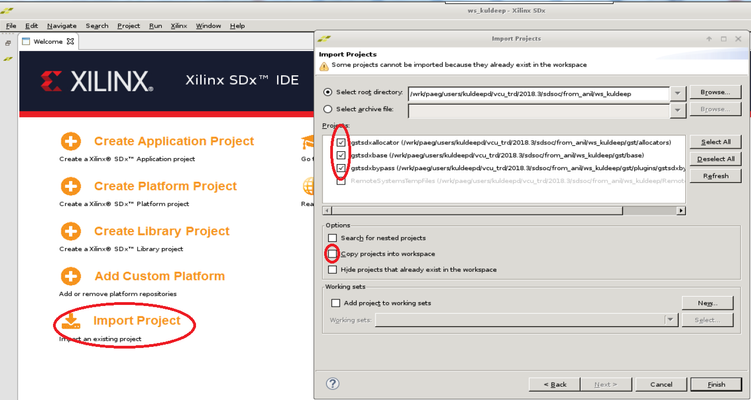
- Click 'Import Project' from the welcome screen, select Import Type as "Eclipse workspace or zip file", click Next. Browse to the current working directory and make sure all projects are selected as shown in the figure. De-select "Copy projects into workspace". Click Finish.
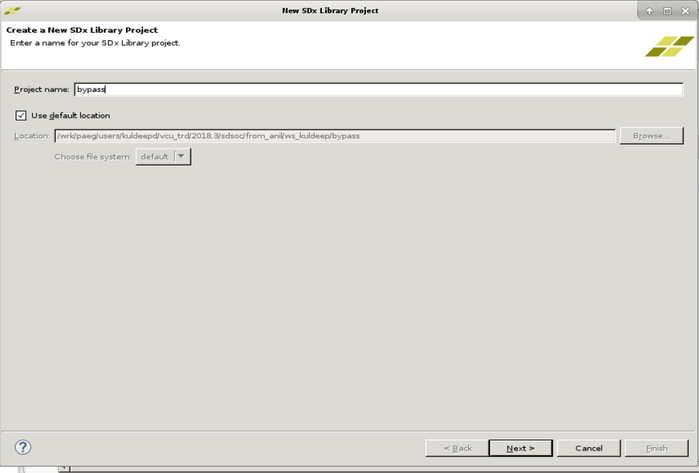
- Click 'File -> New → SDx Library Project'. Enter bypass as project name and click 'Next'.
- Select Accelerated Library Type as "Shared Library" and click Next.
- Click + symbol to add Custom Platform', browse to the $TRD_HOME/apu/vcu_sdx folder and click OK. Select the "vcu_sdx [custom]" platform from the list and click 'Next'.
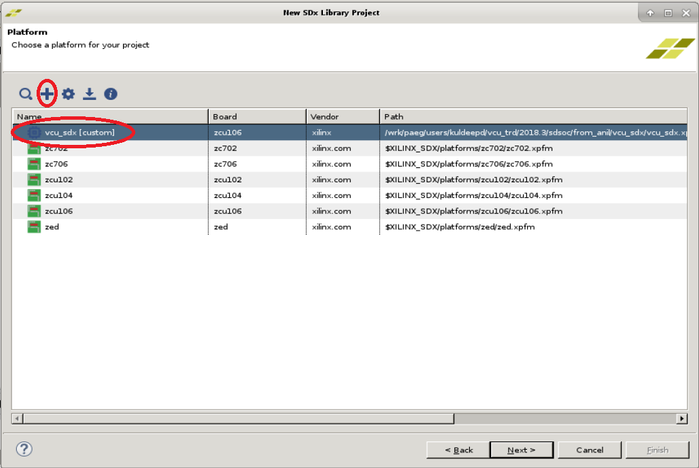
- Click Next in System Configuration window.
- Select "By-Pass" from the template list and click 'Finish'.
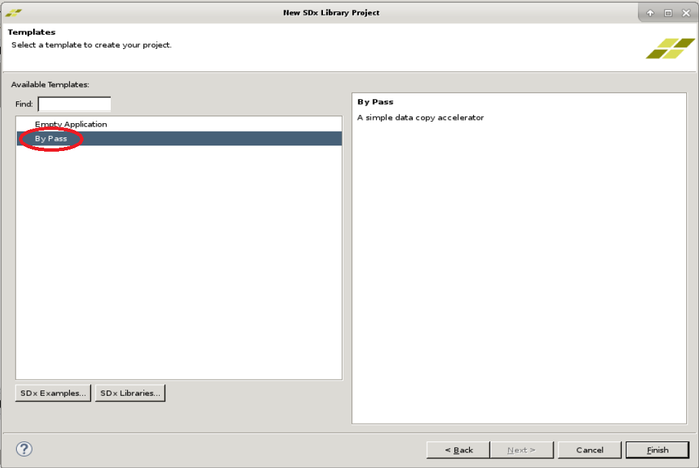
- For Acceleration in HW following steps to be executed:
- With HW Acceleration, in the "SDx Application Project Settings" panel, keep the active build configuration to "Release" which will have the pre-selected Hardware Function marked for acceleration. Make sure the 'Generate SD card image' box is checked.
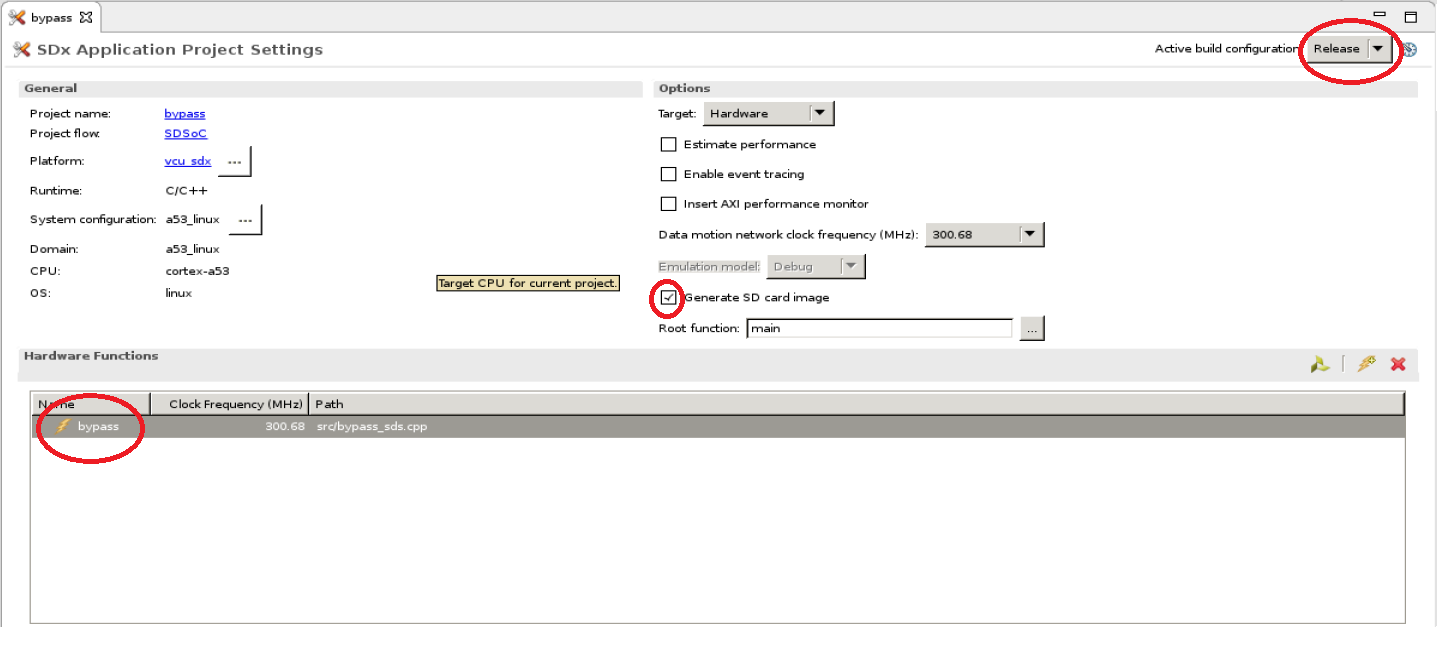
- With HW Acceleration, in the "SDx Application Project Settings" panel, keep the active build configuration to "Release" which will have the pre-selected Hardware Function marked for acceleration. Make sure the 'Generate SD card image' box is checked.
- Right-click the "bypass" project in the explorer panel and select 'Build Project'. Copy the generated SD card image.
- When the build is finished, right-click the "gstsdxbypass" project and select "Build Project". Copy the generated libraries and the plugin.
Note: This project has a dependency on "bypass" and the build will fail if "bypass" was not built previously.
% cp bypass/Release/sd_card/BOOT.BIN  $TRD_HOME/images/vcu_sdx/
% cp bypass/Release/sd_card/image.ub  $TRD_HOME/images/vcu_sdx/
% cp bypass/Release/sd_card/libbypass.so $TRD_HOME/images/vcu_sdx/lib/
% cp gst/allocators/Debug/libgstsdxallocator.so gst/base/Debug/libgstsdxbase.so $TRD_HOME/images/vcu_sdx/lib
% cp gst/plugins/gstsdxbypass/Debug/libgstsdxbypass.so $TRD_HOME/images/vcu_sdx/lib/
2 Other Information
2.1 Known Issues
- For VCU related known issues please refer AR# 71653: PetaLinux 2018.3 - Product Update Release Notes and Known Issues.
2.2 Limitations
- For VCU related limitations please refer AR# 71653: PetaLinux 2018.3 - Product Update Release Notes and Known Issues and PG252 link.
2.3 Optimum VCU Encoder parameters for use-cases:
Video streaming:
- Video streaming use-case requires very stable bitrate graph for all pictures.
- It is good to avoid periodic large Intra pictures during the encoding session
- Low-latency rate control (hardware RC) is the preferred control-rate for video streaming, it tries to maintain equal amount frame sizes for all pictures.
- Good to avoid periodic Intra frames instead use low-delay-p (IPPPPP…)
- VBR is not a preferred mode of streaming.
Performance: AVC Encoder settings:
- It is preferred to use 8 or higher slices for better AVC encoder performance.
- AVC standard does not support Tile mode processing which results in processing of MB rows sequentially for entropy coding.
Quality: Low bitrate AVC encoding:
- Enable profile=high and use qp-mode=auto for low-bitrate encoding use-cases.
- The high profile enables 8x8 transform which results in better video quality at low bitrates.
3 Appendix A - Input Configuration File (input.cfg)
The example configuration files are stored at /media/card/config/ folder.
Common Configuration:
It is the starting point of common configuration.
Num of Input:
Provide the number of input. this is always 1 for this design.
Output:
Select the video interface.
Options: HDMI or DP
Out Type:
Options: display and stream
Display Rate:
Pipeline frame rate.
Options: 30 FPS or 60 FPS for each stream.
Exit:
It indicates to the application that the configuration is over.
Input Configuration:
It is the starting point of input configuration.
Input Num:
Starting Nth input configuration.
Options: 1
Input Type:
Input source type.
Options: HDMI, File, Stream
Uri:
File path or Network URL. Applicable for file playback and stream-in pipeline only. Supported file formats for playback are ts, mp4 and mkv.
Options: file:///media/usb/abc.ts (for file path), udp://192.168.26.89:5004/ (for Network streaming, Here 192.168.26.89 is IP address and 5004 is port no)
Raw:
To tell pipeline is processed or pass-through.
Options: True, False
Width:
The width of the live source.
Options: 3840, 1920
Height:
The height of the live source.
Options: 2160, 1080
Accelerator Flag:
Enable/disable SDx accelerator. In this release, the accelerator will work as a bypass filter.
Options: True, False
Exit:
It indicates to the application that the configuration is over.
Encoder Configuration:
It is the starting point of encoder configuration.
Encoder Num:
Starting Nth encoder configuration.
Options: 1
Encoder Name:
Name of the encoder.
Options: AVC, HEVC
Profile:
Name of the profile.
Options: baseline, main or high for AVC. Main for HEVC.
Rate Control:
Rate control options.
Options: CBR, VBR, and low-latency.
Filler Data:
Filler Data NAL units for CBR rate control.
Options: True, False
QP:
QP control mode used by the VCU encoder.
Options: Uniform, Auto
L2 Cache:
Enable or Disable L2Cache buffer in encoding process.
Options: True, False
Latency Mode:
Encoder latency mode.
Options: normal, sub_frame
Low Bandwidth:
If enabled, decrease the vertical search range used for P-frame motion estimation to reduce the bandwidth.
Options: True, False
Gop Mode:
Group of Pictures mode.
Options: Basic, low_delay_p, low_delay_b
Bitrate:
Target bitrate in Kbps
Options: 1-60000
B Frames:
Number of B-frames between two consecutive P-frames
Options: 0-4
Slice:
The number of slices produced for each frame. Each slice contains one or more complete macroblock/CTU row(s). Slices are distributed over the frame as regularly as possible. If slice-size is defined as well more slices may be produced to fit the slice-size requirement.
Options:
4-22 4kp resolution with HEVC codec
4-32 4kp resolution with AVC codec
4-32 1080p resolution with HEVC codec
4-32 1080p resolution with AVC codec
GoP Length:
The distance between two consecutive I frames
Options: 1-1000
Format:
The format of input data.
Options: NV12
Preset:
Options: HEVC_HIGH, HEVC_MEDIUM, HEVC_LOW, AVC_HIGH, AVC_MEDIUM, AVC_LOW, Custom
Exit
It indicates to the application that the configuration is over.
Record Configuration:
It is the starting point of record configuration.
Record Num:
Starting Nth record configuration.
Options: 1
Out-File Name:
Record file path.
Options: /media/usb/abc.ts
Duration:
Duration in minutes.
Options: 1-3
Exit
It indicates to the application that the configuration is over.
Streaming Configuration:
It is the starting point of streaming configuration.
Streaming Num:
Starting Nth Streaming configuration.
Options: 1.
Host IP:
The host to send the packets to
Options: 192.168.25.89 or Windows PC IP
Port:
The port to send the packets to
Options: 5004,5008,5012 and 5016.
Exit
It indicates to the application that the configuration is over.
It is the starting point of trace configuration.
FPS Info:
To display fps info on the console.
Options: True, False
APM Info:
To display APM counter number on the console.
Options: True, False
Pipeline Info:
To display pipeline info on console.
Options: True, False
Exit
It indicates to the application that the configuration is over.
4 Appendix B
- To check the link status, resolution and video node of HDMI input source, run below xmedia-ctl command.
$ xmedia-ctl -p -d /dev/media0
When HDMI source is connected to 4KP60 resolution, it shows:
root@zcu106_vcu_trd:/media/card# xmedia-ctl -p -d /dev/media0
Media controller API version 4.14.0

Media device information
------------------------
driver          xilinx-video
model           Xilinx Video Composite Device
serial
bus info
hw revision     0x0
driver version  4.14.0

Device topology
- entity 1: vcap_hdmi output 0 (1 pad, 1 link)
            type Node subtype V4L flags 0
            device node name /dev/video0 -----> Video node for HDMI Rx source
        pad0: Sink
                <- "a0080000.v_proc_ss":1 [ENABLED]

- entity 5: a0080000.v_proc_ss (2 pads, 2 links)
            type V4L2 subdev subtype Unknown flags 0
            device node name /dev/v4l-subdev0
        pad0: Sink
                [fmt:VYYUYY8_1X24/3840x2160 field:none]
                <- "a0000000.v_hdmi_rx_ss":0 [ENABLED]
        pad1: Source
                [fmt:VYYUYY8_1X24/3840x2160 field:none]
                -> "vcap_hdmi output 0":0 [ENABLED]

- entity 8: a0000000.v_hdmi_rx_ss (1 pad, 1 link)
            type V4L2 subdev subtype Unknown flags 0
            device node name /dev/v4l-subdev1
        pad0: Source
                [fmt:VYYUYY8_1X24/3840x2160 field:none colorspace:rec709]
                [dv.caps:BT.656/1120 min:0x0@25000000 max:4096x2160@297000000 stds:CEA-861,DMT,CVT,GTF caps:progressive,reduced-blanking,custo]
                [dv.detect:BT.656/1120 3840x2160p60 (4400x2250) stds:CEA-861 flags:CE-video] -----> Resolution and Frame-rate of HDMI Rx source
                -> "a0080000.v_proc_ss":0 [ENABLED]
NOTE: Check resolution and frame-rate of "dv.detect" under "v_hdmi_rx_ss" node.
When HDMI source is not connected, it shows:
root@zcu106_vcu_trd:/media/card# xmedia-ctl -p -d /dev/media0
Media controller API version 4.14.0

Media device information
------------------------
driver          xilinx-video
model           Xilinx Video Composite Device
serial
bus info
hw revision     0x0
driver version  4.14.0

Device topology
- entity 1: vcap_hdmi output 0 (1 pad, 1 link)
            type Node subtype V4L flags 0
            device node name /dev/video0 -----> Video node for HDMI Rx source
        pad0: Sink
                <- "a0080000.v_proc_ss":1 [ENABLED]

- entity 5: a0080000.v_proc_ss (2 pads, 2 links)
            type V4L2 subdev subtype Unknown flags 0
            device node name /dev/v4l-subdev0
        pad0: Sink
                [fmt:VYYUYY8_1X24/3840x2160 field:none]
                <- "a0000000.v_hdmi_rx_ss":0 [ENABLED]
        pad1: Source
                [fmt:VYYUYY8_1X24/3840x2160 field:none]
                -> "vcap_hdmi output 0":0 [ENABLED]

- entity 8: a0000000.v_hdmi_rx_ss (1 pad, 1 link)
            type V4L2 subdev subtype Unknown flags 0
            device node name /dev/v4l-subdev1
        pad0: Source
                [fmt:VYYUYY8_1X24/3840x2160 field:none colorspace:rec709]
                [dv.caps:BT.656/1120 min:0x0@25000000 max:4096x2160@297000000 stds:CEA-861,DMT,CVT,GTF caps:progressive,reduced-blanking,custo]
                [dv.query:no-link] -----> HDMI Rx Link Status
                -> "a0080000.v_proc_ss":0 [ENABLED]
NOTE: Here "dv.query:no-link" under "v_hdmi_rx_ss" node shows HDMI-Rx source is not connected or HDMI-Rx source is not active(Try waking up the device by pressing a key on remote).
- Follow below steps to switch the HDMI-Rx resolution from 1080p60 to 4kp60.
- Check current HDMI Input Source Resolution (1080p60) by following the above-mentioned steps.
- Run vcu_gst_app for current HDMI resolution (1080p60) by executing the following command.
$ vcu_gst_app /media/card/config/input.cfg
Below configurations needs to be set in input.cfg for HDMI-1080p60.
Common Configuration    : START
Num Of Input            : 1
Output                  : HDMI
Out Type                : Display
Frame Rate              : 60
Exit

Input Configuration     : START
Input Num               : 1
Input Type              : hdmi
Raw                     : TRUE
Width                   : 1920
Height                  : 1080
Exit
- Change Resolution of HDMI Input Source from 1080p60 to 4kp60 by following below steps.
- Set the HDMI source resolution to 4kp60 (Homepage → settings → display & Sound → Resolution → change to 4kp60).
- Save the configuration to take place the change.
- Verify the desired HDMI Input Source Resolution (4kp60) by following the above-mentioned steps.
- Change Resolution of HDMI Input Source from 1080p60 to 4kp60 by following below steps.
- If HDMI Tx link-up issue is observed after Linux booting, use the following command:
$ modetest -D a0070000.v_mix -s 39:3840x2160-60@AR24 -w 35:"alpha":0
- Run the following gst-launch-1.0 command to display raw HDMI video using GStreamer pipeline.
$ gst-launch-1.0 v4l2src device=/dev/video0 io-mode=4 ! video/x-raw, width=3840, height=2160, format=NV12, framerate=60/1 ! queue ! kmssink bus-id="a0070000.v_mix"
- Run the following gst-launch-1.0 command for file playback using GStreamer pipeline.
$ gst-launch-1.0 uridecodebin uri="file:///media/usb/test.ts" ! queue max-size-bytes=0 ! kmssink bus-id="a0070000.v_mix"
NOTE: File location should be USB-3.0 to avoid the read-write bandwidth issue.
- Run the following gst-launch-1.0 command to stream-out HDMI video using GStreamer pipeline.
$ gst-launch-1.0 v4l2src device=/dev/video0 io-mode=4 ! video/x-raw, format=NV12, width=3840, height=2160, framerate=60/1 ! omxh265enc qp-mode=auto gop-mode=basic gop-length=60 b-frames=0 target-bitrate=60000 num-slices=8 control-rate=constant prefetch-buffer=true low-bandwidth=false filler-data=true latency-mode=normal ! queue ! mpegtsmux alignment=7 name=mux ! rtpmp2tpay ! udpsink host=192.168.25.89 port=5004
NOTE: Here 192.168.25.89 is host/client IP address and 5004 is port no.
- Run the following gst-launch-1.0 command to display stream-in video using Gstreamer pipeline where 5004 is port no.
$ gst-launch-1.0 udpsrc port=5004 buffer-size=60000000 caps="application/x-rtp, clock-rate=90000" ! rtpjitterbuffer latency=1000 ! rtpmp2tdepay ! tsparse ! video/mpegts ! tsdemux name=demux ! queue ! h265parse ! omxh265dec internal-entropy-buffers=5 latency-mode=normal ! queue max-size-bytes=0 ! kmssink bus-id="a0070000.v_mix"
Notes for gst-launch-1.0 commands:
- Make sure HDMI-Rx media pipeline is configured for 4kp60 resolution and source/sink have the same color format. Run below xmedia-ctl commands to set resolution and format of HDMI scaler node.
When HDMI Input Source is NVIDIA SHIELD
$ xmedia-ctl -d /dev/media0 -V "\"a0080000.v_proc_ss\":0  [fmt:RBG888_1X24/3840x2160 field:none]"
$ xmedia-ctl -d /dev/media0 -V "\"a0080000.v_proc_ss\":1  [fmt:VYYUYY8_1X24/3840x2160 field:none]"
NOTE: Make sure NVIDIA SHIELD is configured for 4kp resolution and RGB888 color format.
When HDMI Input Source is ABOX
$ xmedia-ctl -d /dev/media0 -V "\"a0080000.v_proc_ss\":0  [fmt:VYYUYY8_1X24/3840x2160 field:none]"
$ xmedia-ctl -d /dev/media0 -V "\"a0080000.v_proc_ss\":1  [fmt:VYYUYY8_1X24/3840x2160 field:none]"
NOTE: Make sure ABOX is configured for 4kp resolution and VYYUYY8 color format.
© Copyright 2019 - 2022 Xilinx Inc. Privacy Policy