Xilinx V4L2 hdmirx driver
Table of Contents
Introduction
The HDMI 1.4/2.0 Receiver Subsystem is a feature-rich soft IP incorporating all the necessary logic to properly interface with PHY layers and provide HDMI decoding functionality. The subsystem is a hierarchical IP that bundles a collection of HDMI RX-related IP sub-cores and outputs them as a single IP. The subsystem receives the captured TMDS data from the video PHY layer. It then extracts the video and audio streams from the HDMI stream and converts it to video and audio streams.
The HDMI 1.4/2.0 Receiver Subsystem is a MAC subsystem which works with a Video PHY Controller (PHY) to create a video connectivity system. The HDMI 1.4/2.0 Receiver Subsystem is tightly coupled with the Xilinx Video PHY Controller, which itself is independent and offer flexible architecture with multiple-protocol support. Both MAC and PHY are dynamically programmable through the AXI4-Lite interface.
The HDMI 1.4/2.0 Receiver Subsystem is a MAC subsystem which works with a Video PHY Controller (PHY) to create a video connectivity system. The HDMI 1.4/2.0 Receiver Subsystem is tightly coupled with the Xilinx Video PHY Controller, which itself is independent and offer flexible architecture with multiple-protocol support. Both MAC and PHY are dynamically programmable through the AXI4-Lite interface.
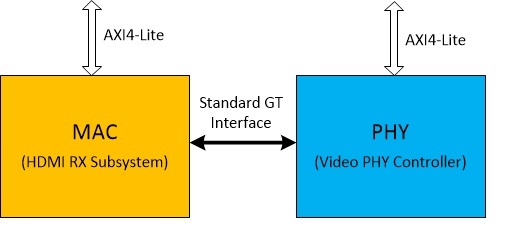
MAC Interface with PHY
Driver Overview
HDMI Rx is the first node in the capture pipeline. The linux driver is implemented within the V4L2 framework and creates a subdev node which can be used to query and configure the hdmi-rx IP core. Rx driver provides an abstracted view of the feature set provided by each included sub-core. It dynamically manages the data and control flow through the processing elements, based on the input stream configuration detected at run time. Internally, it relies on sub-core drivers to configure the sub-core IP blocks.Xilinx HDMI Rx is tightly coupled with Xilinx video phy driver and manages the interaction with PHY layer internally. Xilinx VPhy driver is an integral part of the solution and is automatically pulled-in when Xilinx HDMI Rx driver is selected in the kernel configuration.
Note: To support low resolution input (modes whose line rate is below the specified GT threshold) NI-DRU block is enabled. This requires an additional input clock source for the low resolution support. Refer HDMI IP design guide to get additional details on the DRU requirements.
IP/Driver Features
| IP Feature | 2018.1 hdmi-modules | 2018.3 and onward hdmi-modules |
| IP Version Supported | 3.1 | 3.1 |
| HDMI 2.0 and 1.4b compatible | Y | Y |
| pixel per clock | IP supports 2 or 4 ppc Driver tested for 2 ppc only. | IP supports 2 or 4 ppc Driver tested for 2 ppc only. |
| Supports resolutions up to 4,096 x 2,160 @60 fps | Y | Y |
| 8, 10, 12, and 16-bit Deep-color support | 8 & 10-bit Only | 8 & 10-bit Only |
| Support color space for RGB, YUV 4:4:4, YUV 4:2:2, YUV 4:2:0 | Support all color spaces | Support all color spaces |
| Support AXI4-Stream Video output stream and Native Video output stream | Axi-Stream Video Only | Axi-Stream Video Only |
| Optional High Bandwidth Digital Copy Protection (HDCP) 1.4 support | N | N |
| Optional HDCP 2.2 support | N | N |
| Optional Video over AXIS compliant NTSC/PAL Support | N | Y |
| Optional Video over AXIS compliantYUV420 Support | Y | Y |
Kernel Configuration Options for Driver
2018.1 and onwards: Driver is added as an out-of-tree kernel module and therefore requires no kernel configuration However to enable the driver user must include it in the rootfs. Following steps are required enable the driver
- Make sure the meta-user layer has the recipe-hdmi included
- For 2019.2 onwards
Add the recipe to petalinux image. Edit ./meta-user/conf/user-rootfsconfig and add the new recipe at the end
CONFIG_kernel-module-hdmi
- For 2018.1 to 2019.1
- Add the recipe to petalinux image. Edit ./meta-user/recipes-core/images/petalinux-image-full.bbappend and add the new recipe at the end
- NOTE - While using 2018.1 petalinux, the file name was ./meta-user/recipes-core/images/petalinux-image.bbappend
- Add the recipe to petalinux image. Edit ./meta-user/recipes-core/images/petalinux-image-full.bbappend and add the new recipe at the end
IMAGE_INSTALL_append = " kernel-module-hdmi"
- Next include the driver in the rootfs
% petalinux-config -c rootfs
- Select "user-pakages->modules->kernel-module-hdmi", save and exit
- Build the project
%petalinux-build
Device Tree Binding
The dts node should be defined with correct hardware configuration. How to define the node is documented in2019.1: Documentation/devicetree/bindings/xlnx,v-hdmi-rx-ss.txt
2018.3: Documentation/devicetree/bindings/xlnx,v-hdmi-rx-ss.txt
2018.3: Documentation/devicetree/bindings/xlnx,v-hdmi-rx-ss.txt
2018.1: Documentation/devicetree/bindings/xlnx%2Cv-hdmi-rx-ss.txt
Sysfs entries are accessible at /sys/devices/platform/amba_pl\@0/<device_addr>/
For ex:
To read out information on detected stream
To enable detailed logging of hdcp events
Disclaimer: It is user’s responsibility to provide and protect the confidential key data. HDCP Keys must be programmed into the EEPROM on the board.
A sample output of media-ctl for a 1080p60Hz input, where capture pipeline has only Rx device node directly connected to video node, is shown below
To visualize input frames, user can also use open source utilities like YAVTA, to capture frames to DDR and write them to SD card for offline viewing. This would require additional IP’s (ex: Xilinx FrameBuffer Write) in the pipeline to write Rx data to DDR
For e.g. to capture a 1920x1080 stream the following command is used
else the driver will use the default edid hard-coded in the driver (sample boot message shown below)
Requirements
Following steps are required to enable this feature
On kernel boot the custom-edid file would be loaded in-place of the default.
Note: Above steps will not work for nfs setups because the file-system is not mounted at the time of firmware request (hdmi-rx driver probe).
Disclaimer: The edid binary provided in the attached recipes-edid.zip archive is an example use-case file and should not be misrepresented as an official edid for Xilinx hdmi-rx core
Device Control
Sysfs interface has been added to the driver to enable the user to query the current device status and/or change certain properties. Below table describes the available commands and the access permissions available| Command Name | Permission | Description |
| hdmi_info | Read-Only by all | Shows detected stream properties |
| hdmi_log | Read-Only by all | Shows event logs captured by the driver |
| hdcp_log | Read-Only by all | Shows event logs captured by the driver |
| hdcp_debug | Write-Only by group and owner | 1: Enable detailed logging of hdcp events 0: Disable detailed logging of hdcp events (0 is the default) |
| hdcp_authenticated | Read-Only by all | 1: Authentication successful 0: Un-authenticated |
| hdcp_encrypted | Read-Only by all | 1: Input stream is encrypted 0: Input stream is unencrypted |
| hdcp_key | R/W by owner only | Allows owner to write the HDCP key binary data (read from EEPROM) to IP |
| hdcp_password | R/W by owner only | Allows owner to set a password for the hdcp key in eeprom. After writing (first) password and (then) key, upon reading back hdcp_password it returns "accepted" when the password could decrypt the key. It reads back "rejected" in all other cases. |
| vphy_info | Read-Only by all | Shows video_phy status for both Rx and Tx |
| vphy_log | Read-Only by all | Shows event logs captured by both Rx and Tx |
Sysfs entries are accessible at /sys/devices/platform/amba_pl\@0/<device_addr>/
For ex:
To read out information on detected stream
%> cat /sys/devices/platform/amba_pl\@0/<device_addr>/hdmi_info
%> echo 1 > /sys/devices/platform/amba_pl\@0/<device_addr>/hdcp_debug
HDCP Support
Driver supports HDCP1.4 and 2.2 Protocols and exposes the sysfs controls to allow user space to load the encrypted HDCP production keys and read-in the requisite password to decrypt the keys. If the provided password is able to decrypt the keys, keys will be loaded into the required IP blocks and the HDCP feature will be enabled. The driver boots with HDCP disabled as default state. User can load the keys any time after the system is running. An example application that demonstrates the HDCP key loading process from user space will be provided by Xilinx for customer reference. For details on HDCP Support provided by the soft IP please refer product guide pg236 on Xilinx.comDisclaimer: It is user’s responsibility to provide and protect the confidential key data. HDCP Keys must be programmed into the EEPROM on the board.
Test procedure
HDMI-Rx is ready to accept data immediately after kernel boot-up. On cable connect the Rx core will detect the input stream and set the MEDIA_BUS format accordingly. One can query the detected format by using the open source media-ctl utility, available as part of kernelA sample output of media-ctl for a 1080p60Hz input, where capture pipeline has only Rx device node directly connected to video node, is shown below
% media-ctl -p -d /dev/media0


Media controller API version 0.1.0

Media device information
------------------------
driver          xilinx-video
model           Xilinx Video Composite Device
serial
bus info
hw revision     0x0
driver version  0.0.0

Device topology
- entity 1: vcap_hdmi output 0 (1 pad, 1 link)
            type Node subtype V4L flags 0
            device node name /dev/video0
        pad0: Sink
                <- "a0000000.v_hdmi_rx_ss":0 [ENABLED]

- entity 5: a0000000.v_hdmi_rx_ss (1 pad, 1 link)
            type V4L2 subdev subtype Unknown flags 0
            device node name /dev/v4l-subdev0
        pad0: Source
                [fmt:RBG24/1920x1080 field:none]
                [dv.caps:BT.656/1120 min:0x0@25000000 max:4096x2160@297000000 stds:CEA-861,DMT,CVT,GTF caps:progressive,reduced-blanking,custom]
                [dv.detect:BT.656/1120 1920x1080p60 (2200x1125) stds:CEA-861 flags:CE-video]
                -> "vcap_hdmi output 0":0 [ENABLED]
To visualize input frames, user can also use open source utilities like YAVTA, to capture frames to DDR and write them to SD card for offline viewing. This would require additional IP’s (ex: Xilinx FrameBuffer Write) in the pipeline to write Rx data to DDR
- Hdmi-Rx ==> FB_Wr (DMA) ==> DDR
For e.g. to capture a 1920x1080 stream the following command is used
yavta -n 3 -c10 -f YUYV -s 1920x1080 --skip 7 -F /dev/video0
raw2rgbpnm -s1920x1080 -f YUYV 1920x1080.bin 1920x1080.pnm
gimp 1280x720.pnm
Custom EDID Support
Driver supports the kernel's direct filesystem lookup capability (Firmware API core feature) allowing users to include a custom EDID in their design. During kernel boot the HDMI Rx driver probe will try to read the custom edid file from /lib/firmware/xilinx/Xilinx-hdmi-rx-edid.bin . If the file is found, it will be read-in (sample boot message shown below)[ 4.359924] xilinx-hdmi-rx a0000000.v_hdmi_rx_ss: Using 2 EDID blocks (256 bytes) from 'xilinx/xilinx-hdmi-rx-edid.bin'. [ 4.360003] [ 4.360003] Successfully loaded edid.
[    4.371492] xilinx-hdmi-rx a0000000.v_hdmi_rx_ss: Direct firmware load for xilinx/xilinx-hdmi-rx-edid.bin failed with error -2
[    4.371497] xilinx-hdmi-rx a0000000.v_hdmi_rx_ss: Using Xilinx built-in EDID.
[    4.371578]
[    4.371578] Successfully loaded edid.
Requirements
- User must add the requisite edid binary file to /lib/firmware/xilinx/ folder in the rootfs
- File name must be set to xilinx-hdmi-rx-edid.bin
Following steps are required to enable this feature
- Add the yocto recipe (to copy the desired binary file in the rootfs) in the meta-user folder. . Example recipe recipes-edid.zip
- For 2019.2 onwards
- Add the recipe to petalinux image. Edit ./meta-user/conf/user-rootfsconfig and add the new recipe at the end
CONFIG_custom-edid
- For 2018.1 to 2019.1
- Add the recipe to petalinux image. Edit ./meta-user/recipes-core/images/petalinux-image-full.bbappend and add the new recipe at the end
- NOTE - While using 2018.1 petalinux, the file name was ./meta-user/recipes-core/images/petalinux-image.bbappend
- Add the recipe to petalinux image. Edit ./meta-user/recipes-core/images/petalinux-image-full.bbappend and add the new recipe at the end
IMAGE_INSTALL_append = " custom-edid"
- Next enable the package in the rootfs
% petalinux-config -c rootfs
- Select "user-pakages->custom-edid", save and exit
- Build the project
%petalinux-build
Note: Above steps will not work for nfs setups because the file-system is not mounted at the time of firmware request (hdmi-rx driver probe).
Disclaimer: The edid binary provided in the attached recipes-edid.zip archive is an example use-case file and should not be misrepresented as an official edid for Xilinx hdmi-rx core
DEBUG Capability
HDMI Linux driver implements the capability to tap IP status at pre-defined points in the control flow. User can enable the debug taps by uncommenting the pre-processor directive (#define DEBUG) to monitor the progress within the driver. All debug prints are sent to serial console and can be viewed in kernel dmesg bufferBoards Supported
Driver has been tested on following boards- zcu102 Rev 1.0
- Zcu106 Rev 1.0
Driver has been tested with HDMI FrameBuffer Example Design design
Change Log
2024.1
2023.2
- Summary:
2023.1
- Summary
- No changes
2022.2
- Summary
- No changes
2022.1
- Summary
- hdmi: Fix compilation errors with v5.15 kernel
- commits
2021.2
- Summary
- No changes
2021.1
- Summary
- Update the bare metal drivers part for 2021.1
- Commits
- hdmirx: Update bare metal driver to 2021.1
- phy: hdmiphy1: Updates for 2021.1
- common: hdcp22_tx: Update the driver for 2021.1
- common: hdcp22_rx: Update driver for 2021.1
- common: hdcp1x: Update driver for 2021.1
- common: xhdmi_example: Fix styling issue in aes256
- common: tmrctr: Update the tmrctr driver
- commond: video_common: Update for 2021.1
- common: Update v_hdmi_common for 2021.1
2020.2
- Summary
- HDR support
- Coverity warnings
- 32 bit audio
- HDCP 2.3 support
- Commits
2020.1
- Summary
- Driver is updated to work with v5.4 kernel
- Minor bug fix in HDMI Rx
- Update the license for 2020.1
- Update to use unified phy driver
- Commits
2019.2
- Summary
- Driver updated for 2019.2
- Enabled suspend and resume
- Updated license file for 2019.2
- Commits
2019.1
- Summary
- Made driver compliant with DTG tool generated Device tree nodes and updated the documentation.
- Added support for NTSC and PAL resolutions
- Added 10bpc media bus format support
- Updated license file for 2019.1
- Commits
- 44d691 dt:bindings: Updated RX dt for max bit per component
- 21c537 hdmitx:hdmirx: 10 bit format support
- cf0a56 hdmitx: hdmirx: vphy: Driver update 5Apr2019
- fe84ed license: Update the license obtained from legal
- 3b3484 dt:bindings: Updated the documentation on DT bindings
- 947f4f tx: hdmirx: vphy: Driver update 14Mar2018
- e96b83 hdmitx:hdmirx:vphy: Support for auto DTG
- e6284b hdmirx:hdmitx: NTSC and PAL resolution support
- cccf4a hdmitx:hdmirx: Adaptation to 4.19 kernel version
2018.3
- Summary
- Added interlace resolution support
- Added support for audio using Xilinx PL Audio Formatter IP
- Fixed bugs found in 2018.1 and earlier releases
- Commits
- 5d42de hdmitx:hdmirx:vphy:dt:bindings: Drivers update 20181004
- 80dbb6 hdmirx:hdmitx: Interlace feild 1 calculation fixed
- 6a4d27 hdmirx: Start audio capture only if audio is detected through channel…
- 125527 hdmirx: Update supported audio formats and sampling rates
- 67648d hdmirx:dt:bindings: Remove AES audio header parsing logic
- f0a2a7 clk: Removing si5324 from hdmi_module
- 74a4c6 dt:bindings: Update related to snd-pcm name
- 1c0710 hdmitx:hdmirx:phy: Update driver version 20180817
- f61a0f hdmirx: Update AES audio header parsing
- 99b8e7 hdmitx:hdmirx:dt:bindings: Updating comments and doc for audio
- f9994e hdmitx:hdmirx:phy: Updated driver IP version
- b8508a hdmitx:hdmirx:dt:bindings: Integration of audio
2018.1
- Summary
- Updated to support v3.1 HDMI-Rx IP. This is the default IP version in the catalogue
- Commits
Related Links
- Linux Drivers
- Xilinx V4L2 Driver
- Video Phy Driver
- HDMI Tx Driver
- HDMI FrameBuffer Example Design 2019.2
- HDMI FrameBuffer Example Design 2019.1
- HDMI FrameBuffer Example Design 2018.3
- HDMI FrameBuffer Example Design 2018.1
© Copyright 2019 - 2022 Xilinx Inc. Privacy Policy