Zynq UltraScale MPSoC 2016.2 Tutorial for design module 6
Zynq UltraScale MPSoC 2016.2 Tutorial for design module 6
Abstract
- Use PL for video capture
- Test Pattern Generator (TPG)
Table of Contents
- HDMI Input
- V4L2 framework
- Test Pattern Generator (TPG)
Block Diagram
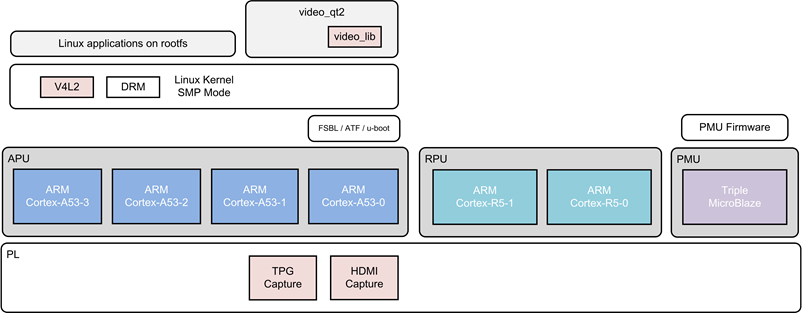
Component Diagram
<<TODO>>Source Code
- Create workspace folder
- Checkout the source code for Linux
This creates a folder “zynqmp_petalinux_bsp” and gets all source files from git repository
- Checkout the source code for PMU FW
This creates a folder “pmu_fw” and gets all source files from git repository
How to build images
Apply Patches
Apply the design-1 patch (refer DESIGN-1)
$ git apply 0001-Mini-Reference-Design-1-ZCU102-2016.2.patch
Apply the design-2 patch
$ git apply 0001-Mini-Reference-Design-2-ZCU102-2016.2.patch
Apply the design-3 patch
$ git apply 0001-Mini-Reference-Design-3-ZCU102-2016.2.patch
Apply the design-4 patch
$ git apply 0001-Mini-Reference-Design-4-ZCU102-2016.2.patch
Apply the design-5 patch
$ git apply 0001-Mini-Reference-Design-5-ZCU102-2016.2.patch
Apply the design-6 patch
$ git apply 0001-Mini-Reference-Design-6-ZCU102-2016.2.patch
FSBL
FSBL build : refer DESIGN-1 at Tutorial 1
PMU Firmware
PMU FW build : refer DESIGN-1 at Tutorial 1
HEARTBEAT Application
Checkout HeartBeat Application sources from git
$ cd 2_rpu0_freertos_app/heartbeat
RPU0 HeartBeat build
follow common_procedure Build HeartBeat Appliction in the link: Common Functions
Video Qt Application
Checkout video_lib, video_cmd sources from git
$ cd 6_pl_video_capture
modify code as per the zip
Build sdk projects
- video_lib (creates a library)
- video_qt2 (creates executable, static link with video_lib)
Device Tree
Use device tree same as DESIGN-1, refer DESIGN-1 at Tutorial 1
Kernel Image
Build the kernel image same as DESIGN-1, refer DESIGN-1 at Tutorial 1
Copy the RPU1's perfapm-server-ctl, PMUFW, FSBL images into petalinux build area
$ cp default_pmufw/Debug/default_pmufw.elf zynqmp_petalinux_bsp/images/linux/pmufw.elf
$ cp default_fsbl/Debug/default_fsbl.elf zynqmp_petalinux_bsp/images/linux/zynqmp_fsbl.elf
$ cp heartbeat/Debug/heartbeat.elf zynqmp_petalinux_bsp/images/linux/.
$ cp perfapm-server/Debug/perfapm-server-ctl.elf zynqmp_petalinux_bsp/images/linux/.
BOOT.BIN image
Get BITSTREAM (it is workaround to fix DisplayPort GT issue)
Checkout https://gitenterprise.xilinx.com/PAEG/zcu102_base_trd_sdsoc_pfm
tag 2016.2
$ cp default_pmufw/Debug/default_pmufw.elf zynqmp_petalinux_bsp/images/linux/pmufw.elf
$ cp default_fsbl/Debug/default_fsbl.elf zynqmp_petalinux_bsp/images/linux/zynqmp_fsbl.elf
$ cp hardware/prebuilt/zcu102_base_trd_wrapper.bit zynqmp_petalinux_bsp/images/linux/.
Create BOOT.BIN
$ cd images/linux
$ petalinux-package --force --boot --bif design5.bif
This will create zynqmp_petalinux_bsp/images/linux/BOOT.BIN
How to Execute
- Copy the below files onto SD card (root folder)
boot.bin
- Insert the SD card into zcu102 board
- Connect power cable and UART cable
- Start TeraTerm or any other terminal application on Host PC (to view serial port messages)
- Power ON the board
- The board starts booting, observe for PMU FW messages followed by Linux boot messages
Copy APU application onto SD card
video_qt2/video_qt2
After boot, at shell prompt:
$ /media/card/video_qt2 -r 1920x1080
© Copyright 2019 - 2022 Xilinx Inc. Privacy Policy